Designing a smarter scheduling experience for workforce schedule managers
Oracle · Product Design · Automated scheduling

Designing a smarter scheduling experience for workforce managers.

For a V1, I led product design that helps Schedule Managers move from repetitive manual planning toward automated schedule creation - while balancing customer needs, technical contraints, and an evolving design system.

HealthcareManufacturingRetailUX strategy · Research · Product design
My RoleSr. UX Designer & Principal UX Designer
Who did i work withProduct, Research, Engineering
Timeline3-4 months

Agentic Application mock
01 / Overview

From scheduling foundations to automation

Phase 1 established the implementation and administrative foundation for automated scheduling. In Phase 2, the focus shifted to designing Oracle’s Advanced Scheduling solution: an automated experience that helps Schedule Managers create schedules more efficiently. To better understand customer needs and inform product direction, I initiated a partnership with our internal research team. The research uncovered a key insight that influenced how scheduling information should be organized and presented.

As the project evolved, technical limitations constrained what we could deliver in the initial release. Anticipating these challenges, I explored alternative design approaches to ensure we could still deliver a valuable V1 experience within the available constraints.

What I delivered

This release represents V1 of a multi-year initiative, establishing a foundation for future enhancements to the advanced scheduling experience. I designed and delivered an automated scheduling experience that enables Schedule Managers to generate schedules and automatically assign shifts based on existing work patterns, shifts, and scheduling rules — reducing manual effort and providing a more efficient path to schedule creation.

02 / The Problem

Starting from scratch

At the time, Oracle did have a smart scheduling solution, when Schedule Managers want to create a new schedule for an upcoming scheduling period, they had to resort to excel sheets in order to create and plan their schedules.

Schedule Managers must continuously evaluate staffing needs, like contracted hours, workers preferred availability, scheduling rules, and labor regulations. They need to ensure the right people are assigned to the right shifts while meeting operational and workforce requirements.

Big Opportunity

We have the building blocks to an Automated experience

The original scope focused on the balancing phase: adding or removing shifts based on staffing needs, reallocating resources through transfers or float pools, and considering external agencies before schedules were published.

The initial strategy was to build on Oracle’s Redwood framework and introduce AI where it could provide meaningful value. Questions remained around how customers would use AI credits, how the experience would be priced, and how much customers would be willing to pay.

Revised Scope (Phase 2)

Automating the scheduling lifecycle

The scope expanded to schedule creation, balancing, publishing, and ongoing management with exemptions. The strategy shifted away from a hybrid approach toward an AI-first, agentic experience through Oracle’s Agentic Application.

Because the product and its capabilities were evolving alongside the project, I had to adapt the design approach while staying focused on users’ needs.

U
03 / Research

Customers needed a bigger picture

I initiated a partnership with our internal research team to better understand how Schedule Managers identify staffing gaps and make decisions about reallocating workers.

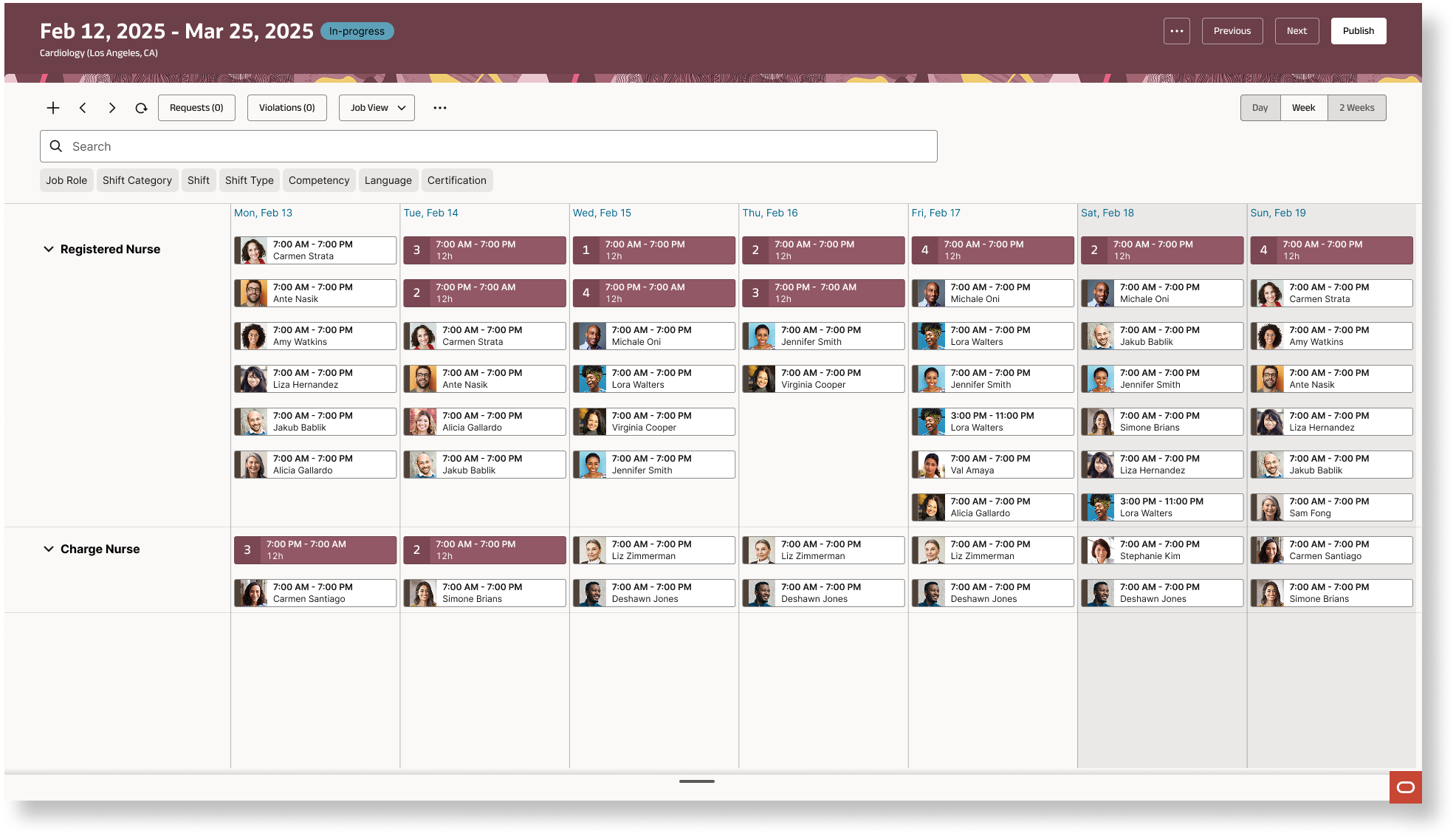
One key question was how much of the schedule they needed to see at once. Would a daily or weekly view be enough, or did they need visibility across the full scheduling period and beyond?

Key Insight
five weeks wasn't always enough.

Agentic Clarity of Purpose

Enables schedule managers to proactively protect staffing coverage across departments. It brings the highest-priority staffing risks into one place, explains what is driving each risk, identifies compliant options to resolve it, and helps managers make and authorize timely decisions—before gaps affect patient care or require costly overtime or agency coverage.

Description of image

Primary user

Schedule Managers who schedule and manage full-life cycle of staffing across multiple department locations.

Core need

Schedule Managers are tired of balancing, they want Agents to handle the repetative task and use smart reasoning.

04 / Research

What I set out to learn

I led three research sessions through an internal Design Critique group. Participants were Oracle employees with inpatient hospital experience or profiles similar to our primary users.

01

What do Schedule Managers need today?

Validate concepts based on customer-requested needs and existing Redwood design patterns.

02

What could they need tomorrow?

Explore an agentic scheduling experience that customers had not explicitly asked for, but that could address deeper pain points.

Research goals

Understand balancing workflowsIdentify pain pointsTest receptiveness to AIUnderstand transparency and controlDefine resource-reallocation context
05 / Key findings

Three insights shifted the conversation

01

A unified view enables confident decisions

Participants responded strongly to a cross-department schedule view they called a “House View.” It helped reveal where resources could be reallocated.

“I need a unified view of all the schedules so that I can efficiently reallocate nurses between departments where there is a need.”

Design implication
Showing open shifts alone was not enough. Managers also needed shift, job role, competencies, float usage, acceptance percentage, call-outs, and other staffing indicators.

02

Users were ready for AI

We expected some resistance to a new AI-driven workflow. Instead, participants were receptive—and often excited—about the possibility of reducing repetitive scheduling work.

“I’m tired of balancing…”

Design implication
The opportunity was not just to make balancing easier, but to reduce how much manual balancing managers needed to do.

03

The Command Center felt familiar

Schedule Managers already understood a centralized hub for shift coverage, labor allocation, open shifts, and float availability.

Design implication
Position AI as an intelligent layer in a familiar, centralized experience instead of introducing an entirely unfamiliar way of working.

Original question

How might we help Schedule Managers balance schedules more efficiently?

Research-led question

How might we automate the scheduling lifecycle so managers spend less time managing schedules and more time making confident staffing decisions?

06 / Design exploration

Three directions, one strategic decision

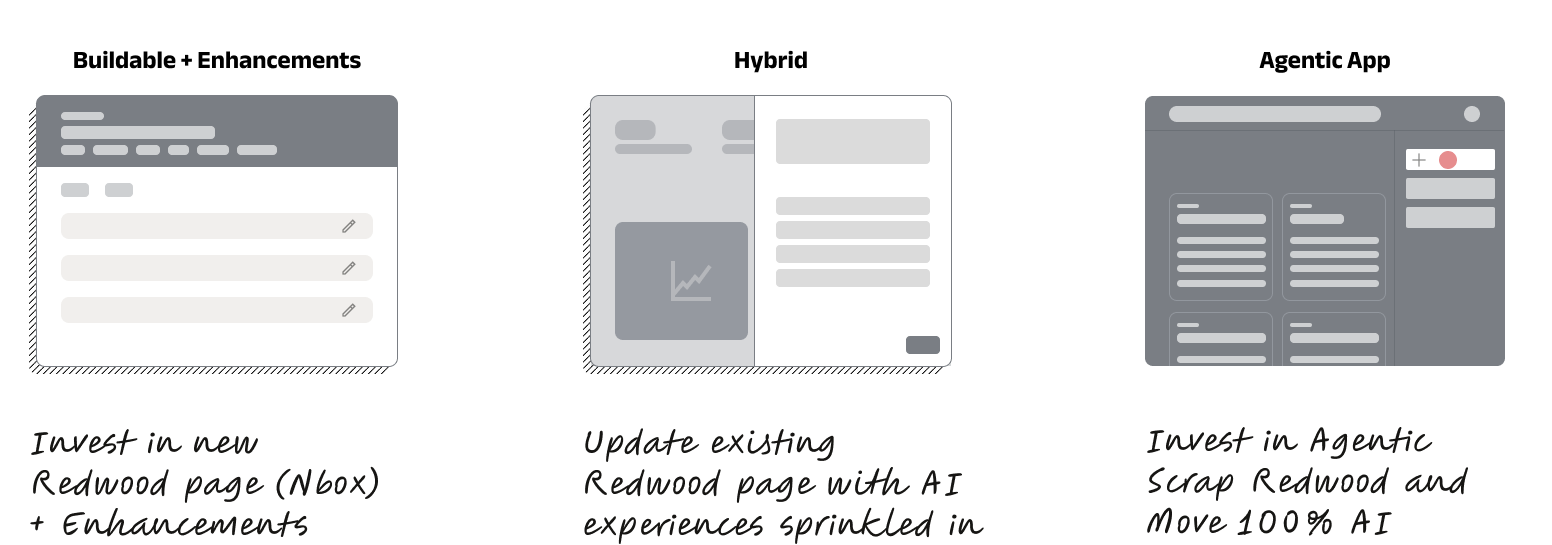
I explored three possible directions to gain alignment with the Product team and presented my design explorations to our VP of Product that helped me understand what is the long-term product strategy.

Wireframes

Design exploration wireframes showing proposed scheduling experience concepts
DIRECTION 01

Buildable + Enhancements

Improve the existing Redwood experience instead of fundamentally changing the workflow.

Customer impact

Preserve visibility and control while reducing the need to jump between schedules and streamlining existing tasks.

High controlLow automation

Research feedback was positive, but the full experience could require more than two years of development and risk falling behind an increasingly AI-driven market.

DIRECTION 02

Hybrid Experience

Combine familiar Redwood workflows with AI recommendations at moments where they can provide the most value.

Customer impact

Keep managers involved in decisions while helping them identify potential assignments faster.

High controlMedium automation

A lower-risk transition to AI, but it would require maintaining traditional experiences alongside the agentic model. This direction was not directly tested with customers.

Chosen direction
DIRECTION 03

Agentic Application

Automate repetitive scheduling work and surface the issues that need human attention.

Customer impact

Shift from managing every task to overseeing exceptions and making important decisions, with human judgment kept in the loop.

Human in the loopHigh automation

V1 also needed to preserve critical familiar workflows, including assigning shifts and responding to Open, Claim, Drop, and Swap requests.

DirectionCustomer controlAutomationStrategic alignment
Buildable + EnhancementsHighLowLow
Hybrid ExperienceHighMediumMedium
Agentic ApplicationHigh, human-in-the-loopHighHigh

Research suggested customers were open to AI taking on more scheduling work. Combined with the evolving product strategy and competitive landscape, this supported moving toward the Agentic Application direction.

07 / Design process

Turning complex requirements into a clearer experience

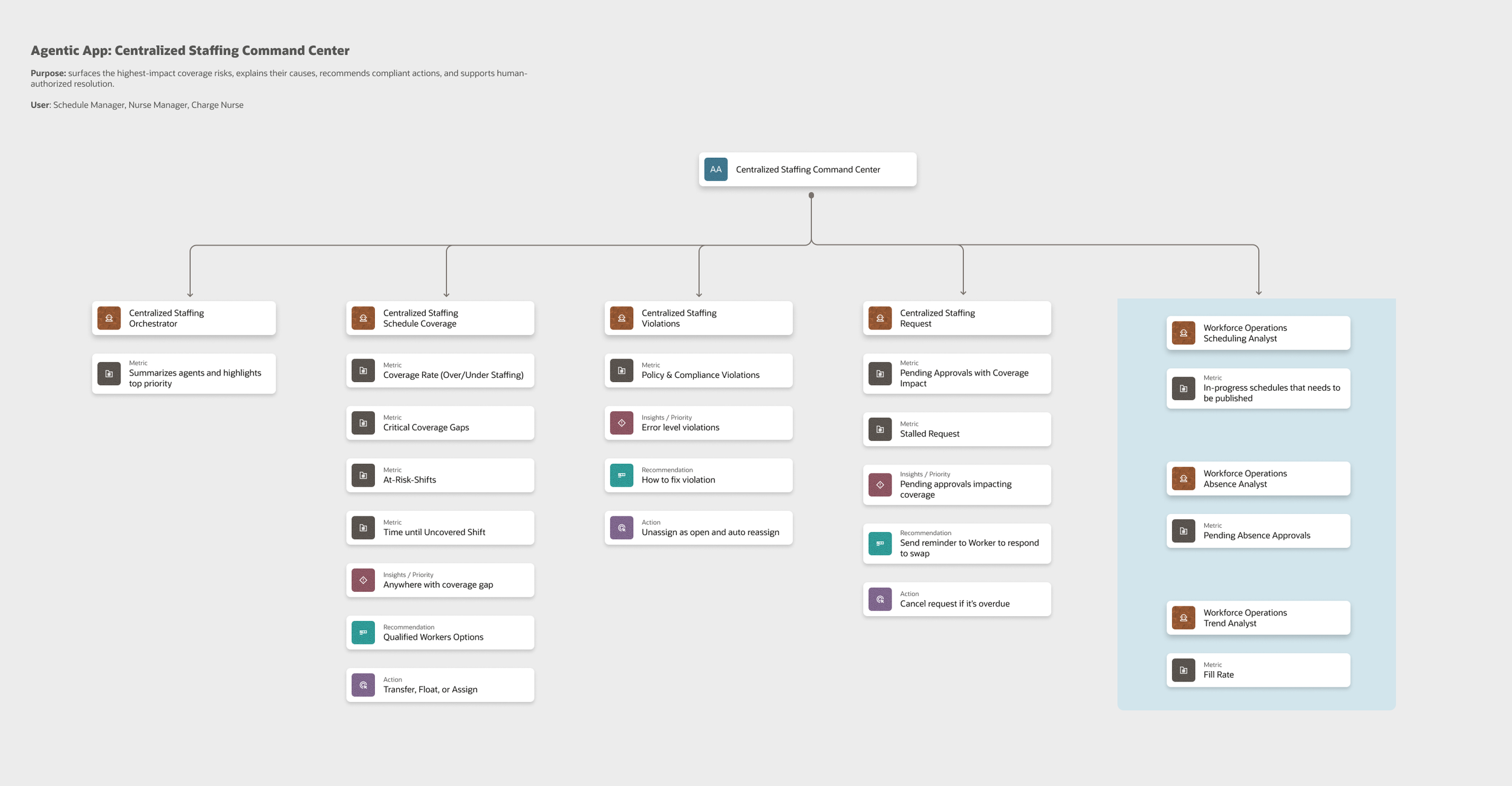
Once product requirements were updated, I organized required metrics into common themes to define what information agents should provide and how it could be made digestible.

1

Define the information

Gather the required metrics and group them into themes to establish the content needed for the experience.

2

Explore the presentation

Use rapid prototypes to explore ways to present a large volume of information clearly and actionably.

3

Adapt as the product evolved

Refine the approach as scope, requirements, product strategy, technical possibilities, and the design system changed.

The power of vibe coding

Using AI to accelerate exploration

I used ChatGPT with a skill that turned my product manager’s Confluence requirements into a working prototype. With so many metrics to consider, this helped me explore more digestible ways to present information and test concepts against the Agentic design system.

It was not always accurate—some components did not match the design system—but it was useful for generating inspiration and communicating an idea early.

Agent mapping diagram from the design process
Agent mapping — organizing agent responsibilities and information needs.
08 / Challenges

Learning fast while navigating constant change

Designing an agentic scheduling experience meant building new expertise while keeping the team aligned through a rapidly evolving product direction.

CHALLENGE 01

What exactly is an agent?

Agentic AI was new territory for me. Alongside my design work, I needed to quickly understand what an agent is, what it can do, and how it could create meaningful value for our customers.

How I approached it

I enrolled in classes and online training through our internal learning resources, building the knowledge I needed to make more informed design decisions as the project progressed.

CHALLENGE 02

Designing through a moving target

Project scope, requirements, product strategy, and even the design system continued to evolve. This made it challenging to maintain momentum while designing toward a shared direction.

How I approached it

When repeated scope changes began affecting planning, I involved my manager to help coordinate a meeting with the product team and realign on scope and timeline. I also partnered closely with the Agentic Application designers to validate the end-to-end flow and apply the right interaction patterns.

09 / Final solution

From managing schedules to managing decisions

The experience is designed to help managers see the issues that matter, understand the context, and take action with AI-supported recommendations.

The agent handles the repetitive work. The Schedule Manager handles the decisions.

Agents can take on repetitive scheduling work and provide best-fit, availability-aware recommendations. Schedule Managers retain oversight and step in when human judgment is needed.

Prioritized issuesBest-fit recommendationsHuman oversightConnected insights

The broader vision also connects workforce, talent, skills, payroll, and costing insights so managers can adapt to changes and fill open shifts with more context.

10 / Impact

Giving managers time back

AI was changing both how I worked as a designer and how customers could work. The opportunity was to rethink the workflow itself—not simply add AI to an existing process.

10–30 min

Daily scheduling work

The project’s stated outcome frames work that traditionally took weeks of planning and 10+ hours of balancing and rebalancing as a short daily workflow.

Best-fit

AI-powered recommendations

Help managers identify suitable, available workers to cover shifts, reducing the burden of finding the right assignment.

Connected

AI insights

Help managers respond to change with connected HCM, talent, skill, payroll, and costing insights, guided by an intelligent assistant.

Before publishing, confirm whether the 10–30 minute figure is a measured result, target, or intended product outcome and label it accordingly.

11 / Reflection

Designing for change is part of designing the product

AI did more than change the tools I used as a designer. It challenged me to rethink how our customers could work—and where human attention creates the most value.

Stay grounded in user needs

When strategy and technology shift quickly, research helps separate a changing solution from the underlying problem worth solving.

Use AI to explore, not replace judgment

Rapid prototyping helped make complex requirements tangible. The designer’s role remained to assess the output, align it with the design system, and make intentional decisions.