
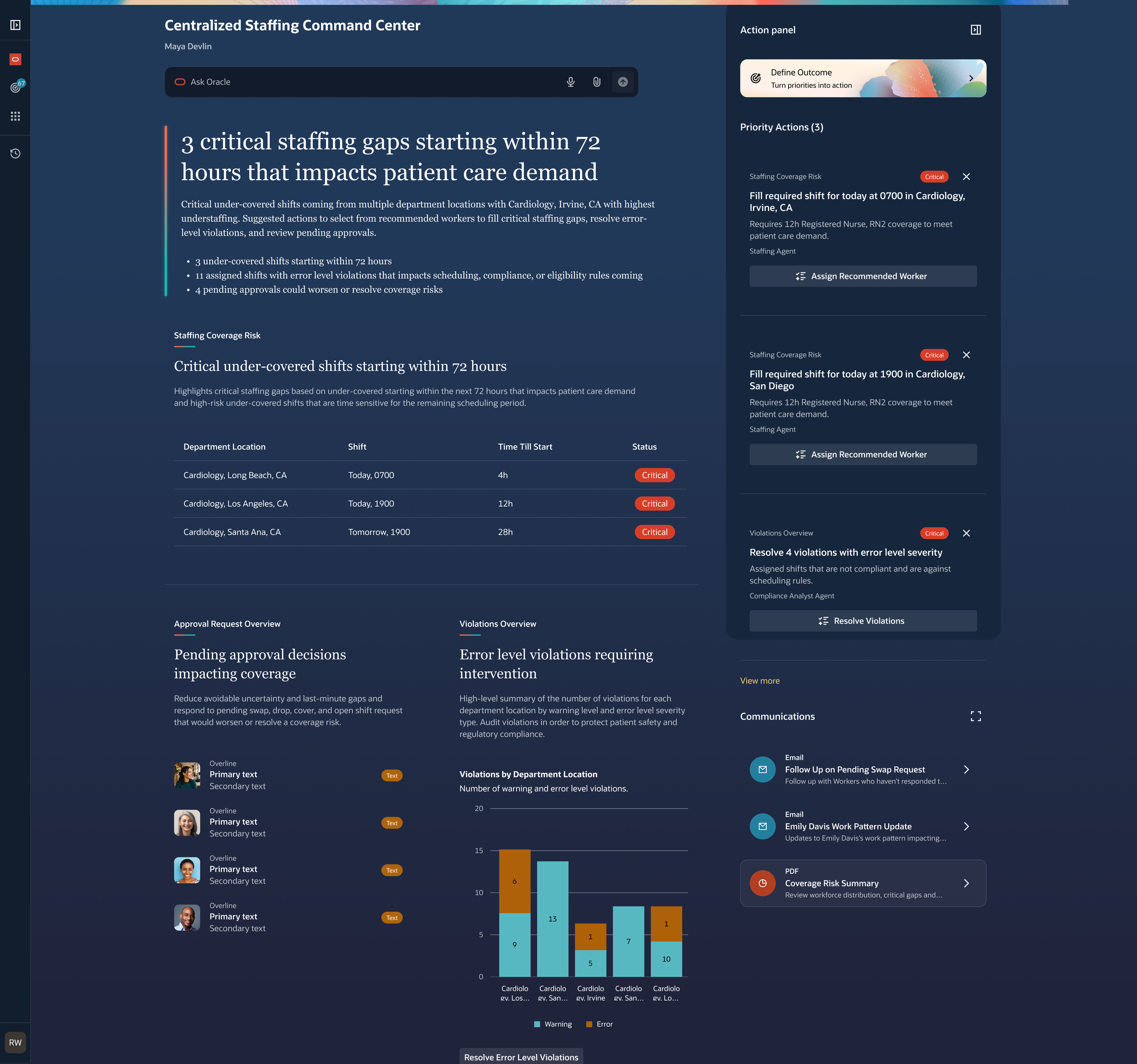
Summary
I led and redesign experience on how users manage schedules
Project timeline: 4-5 week sprint
My role
Principal User Experience Designer: Project scoping, User Flows, Prototyping
Tools: Figma, Chatgpt
Who I worked with
Product Manager, Engineers, UX Designers, UX Researchers.
Problem
Traditional staffing and scheduling rely on manual coordination, disconnected tools, and reactive decisions. Managers must quickly identify coverage gaps, confirm employee eligibility and availability, and rebalance staff across five departments as patient demand changes. The process is time-consuming, difficult to scale, and can lead to inefficiencies and inconsistent decisions.
Goal
Completely redesign the way schedule managers complete task through Oracle Agentic Application that automates repetitive staffing tasks—such as scheduling, balancing, and publishing
Surfacing decision-ready issues in priority order
provide guided recommendations that enable Schedule Managers to act quickly and confidently.
Challenge
Oracle agentic application design system was evolving and constantly changing. Worked with my Product Manager to determine what content to include for a V1.
Too much information, not enough prioritization
A staffing manager may have dozens of staffing signals, but not every issue requires immediate attention.
Control over schedule changes
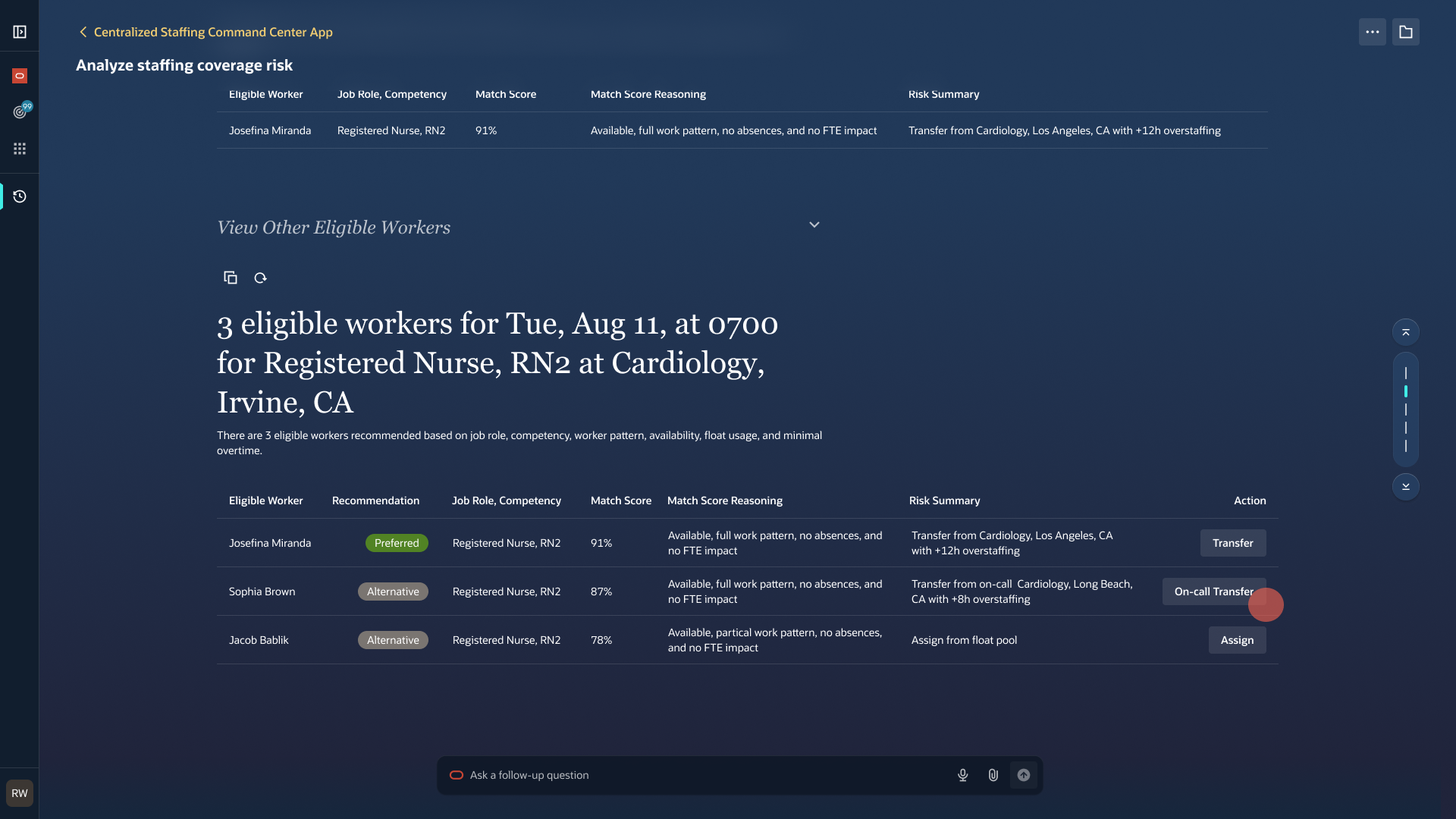
An agent can identify gaps, recommend workers, and rebalance coverage, but staffing decisions carry real consequences. The experience needed to make recommendations clear and easy to review why it’s the best recommendation. I also wanted a way for users to override recommendations or look for alternative solutions as a way to give control over schedule changes for schedule managers.
Project scope
This was a 4-5 week project to hand-off a V1 of this scheduling command center.
Customer story
Maya Devlin who is a schedule manager and is responsible for scheduling for 5 different department locations. Managers were balancing multiple departments, shifting patient demand, employee eligibility, availability, scheduling rules, approvals, and compliance requirements simultaneously.
User Goal
As a Schedule Manager, I want important staffing issues surfaced to me with clear, actionable recommendations so that I can focus on making informed decisions rather than spending time identifying problems, while still maintaining full visibility and control over schedule changes.
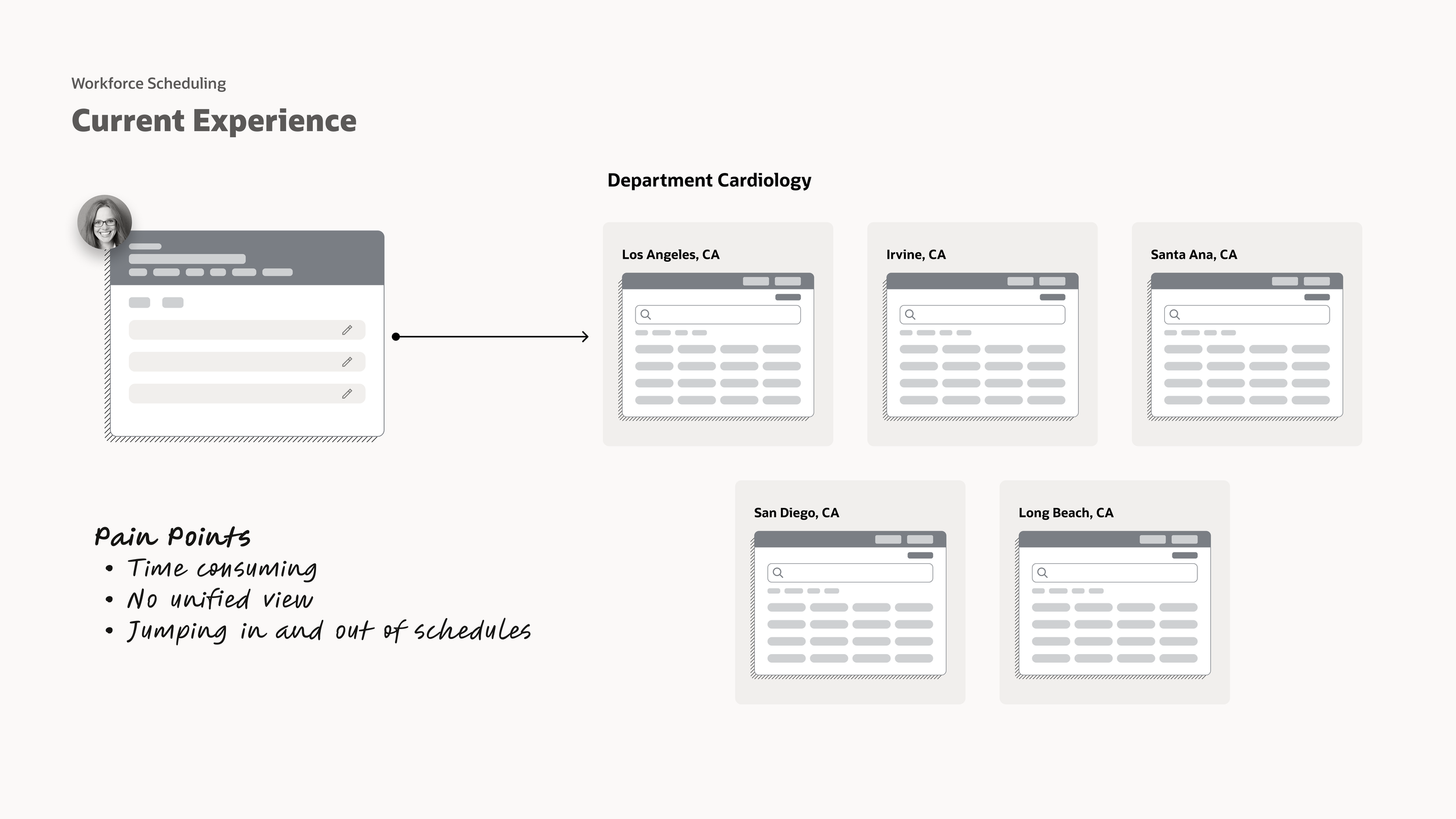
Current experience
There’s no unified view of all the schedules Maya is responsible to help her understand what is the overall health of all department locations. Maya has to jump in and out of 5 schedules during a scheduling period to understand where they can reallocate resources, transfer, float, etc.
Design process
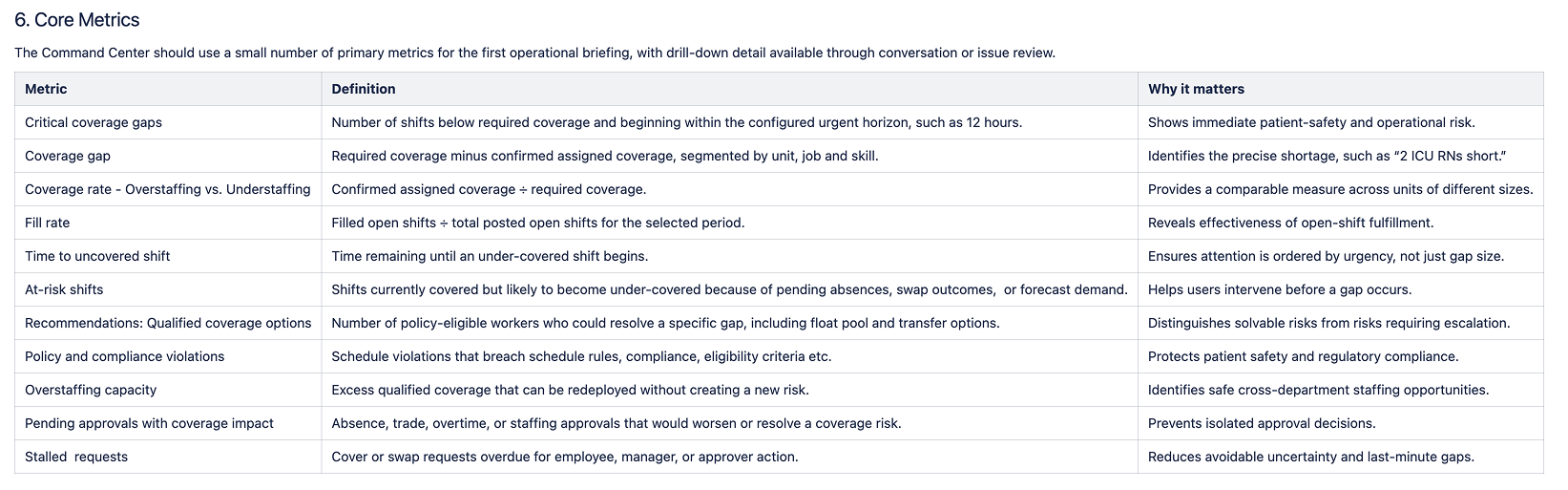
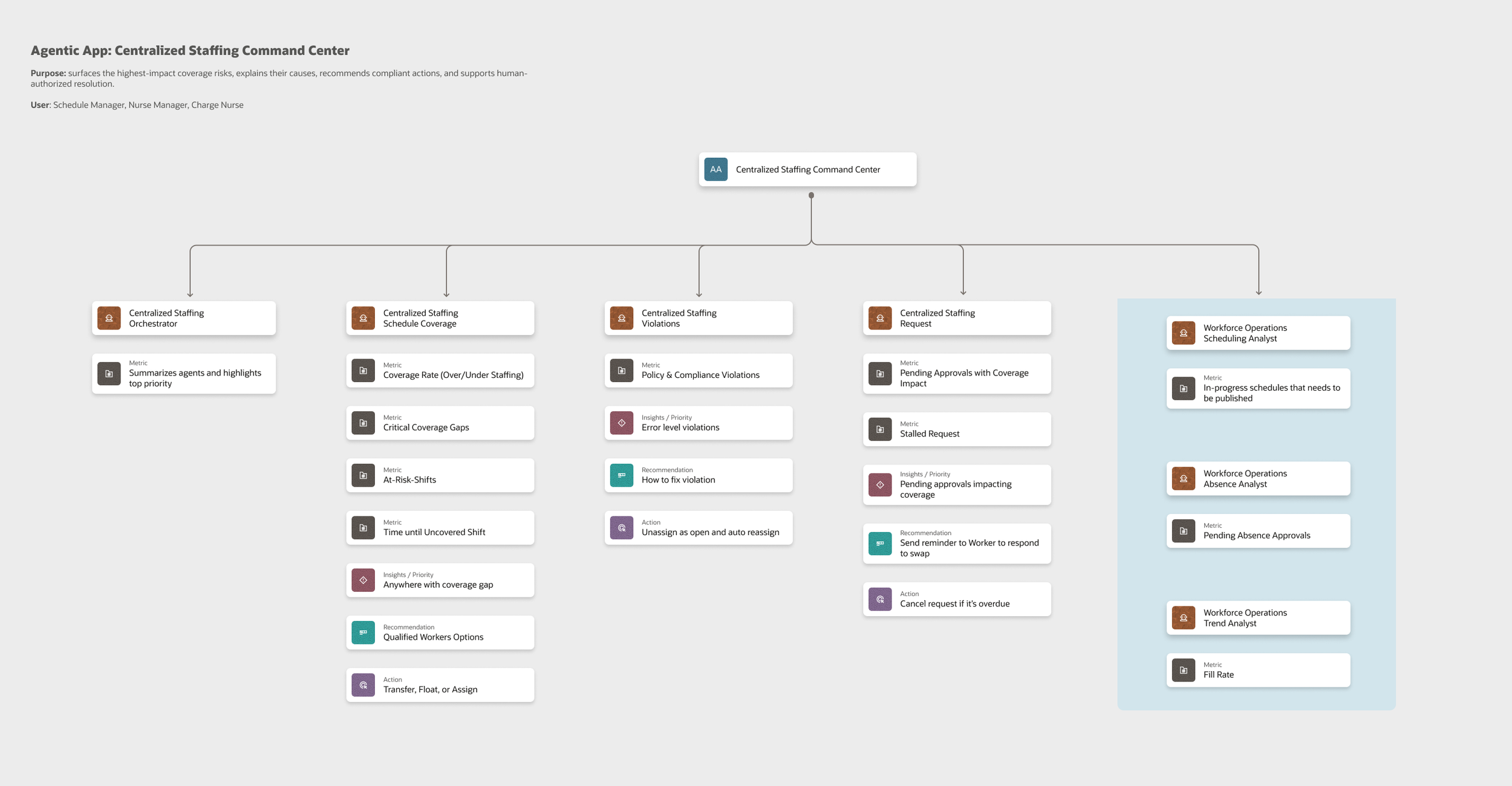
I was given a list of metrics from my product manager as part of the requirement for this command center. Based on those metrics, I grouped and categorize similar metrics and came up with 3 main categories that would turn into agents: Schedule Coverage, Violations, and Request
What agents and what are they responsible for?
I mapped the staffing process to identify where an agent could reduce repetitive work and where human judgment should remain essential. This included what each agents metrics, insights, recommendations and actions associated.
Manager responsibilities
Review recommendations
Understand the reasoning and impact
Approve or modify staffing decisions
Resolve exceptions
Handle situations requiring human judgment
This created a human-in-the-loop model rather than fully autonomous scheduling.
Agent responsibilities
Monitor staffing coverage
Identify emerging gaps
Check eligibility and availability
Surface scheduling and compliance violations
Recommend workers
Identify opportunities to rebalance staff
Prepare actions for manager review
User Flow & Wireframes
Next, I created low-fidelity user flows to plan out how these users flows would look like using our agentic app design system.
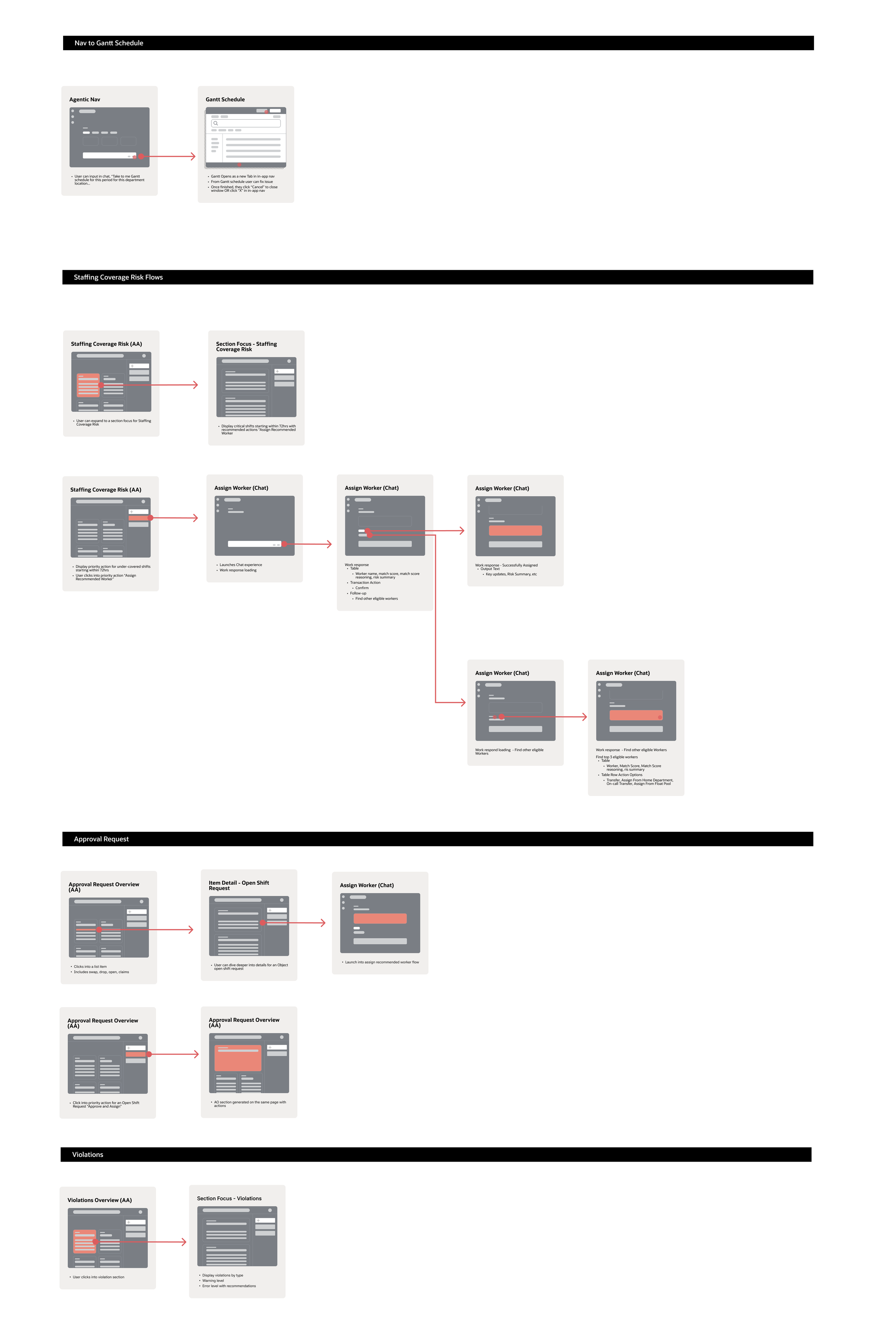
Making complexity scannable
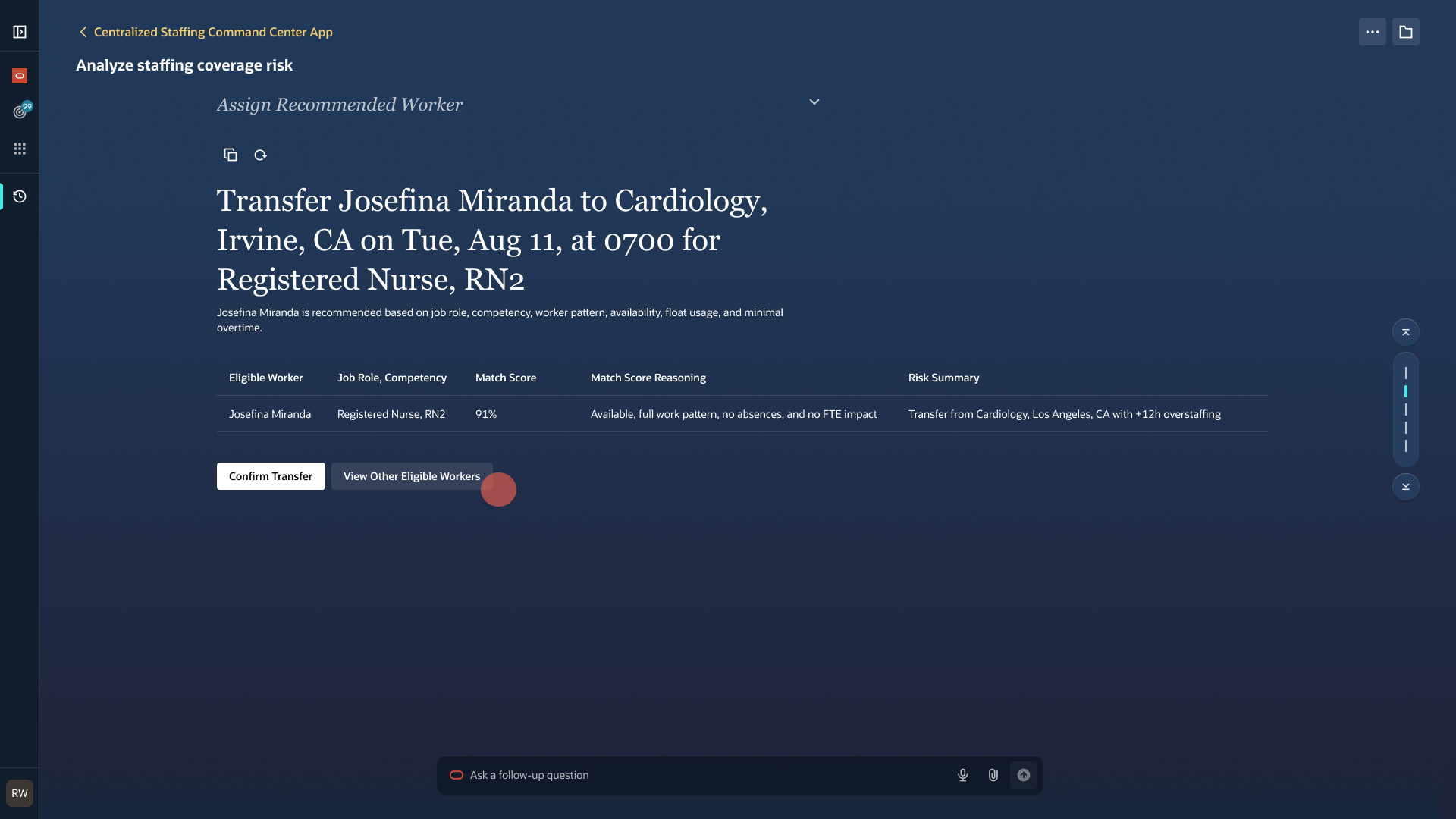
Based on customer research, schedule managers want MORE context and transparency to understand how recommendations are made and sources to validate these decisions made by the agent. I used progressive disclosure to prevent the command center from becoming another overwhelming staffing tool.
The primary view answers three questions quickly:
What is wrong?
Critical staffing risks and violations.
How urgent is it?
Time-to-shift and severity indicators.
What can I do?
There will initially be a phase where users may not trust the agents. In cases where we recommend a worker to assign an open shift to
What are my other options?
Instead of having the user to search for alternatives, we display clear content as to how the agent came up with the recommendation and what were the other alternative recommendations.
High-fidelity visuals
Since this project focused on simplifying the experience for adding relative timespans, a lot of the redesign work involved improving timespan labels and guiding the user to make simple correct decisions and eliminating too many options to choose from. a user need to . which was previously a frustrating due to rigid timespan options, confusing labels, and overwhelming 39 checkboxes to choose from, I focused on s typcially a difficult
User flow
Result
We’ve eliminated the 42 present options and instead give users the flexibility to pick exactly the timespans they want. Users don’t have to have duplicates because they can have control on what they want to see. With the redesign for relative timespans, users can use intuitive and simple drop-down selection which forms a sentence that matches natural human language.
Success metrics
This project is currently being implemented, but I worked with the Product manager to determine what those success metrics look like. Using clickstream data, we want to track
Clickstream data tracking
Add relative dates
Add specific dates
Selections for date measurements
Next steps
As mentioned earlier, this project ended up being scoped into three projects. I’ve completed timespans for Relative dates, now my next steps is to tackle timespans for Specific dates. For the next part of this project, I will used our date picker component provided by the design system (Stencil) which includes single dates and date ranges. The challenge for me is to use the date picker, Stencil and keep a consistent behavior and experience for all the other date pickers. I had to make custom components to full-fill the other date formats; Weeks, Months, Quarters, and Years.